

Guide
Why GA4 isn't tracking all your Shopify purchases
By Metricby · Updated
GA4 not tracking all your Shopify purchases usually comes down to one of five things: ad blockers, declined consent, express checkout (Shop Pay, PayPal, Apple Pay, Google Pay), a tag that stopped running, or a purchase event that never fires. The first two are built into browser-based tracking and can’t be fully fixed. The other three have causes you can find. To find yours, work out which orders are missing. The total alone won’t tell you.
It’s a common problem. One merchant on the Shopify Community found that GA4, set up through Google’s app, counted only every third or fourth purchase, even though begin_checkout arrived for every order.
First, find out which orders are missing
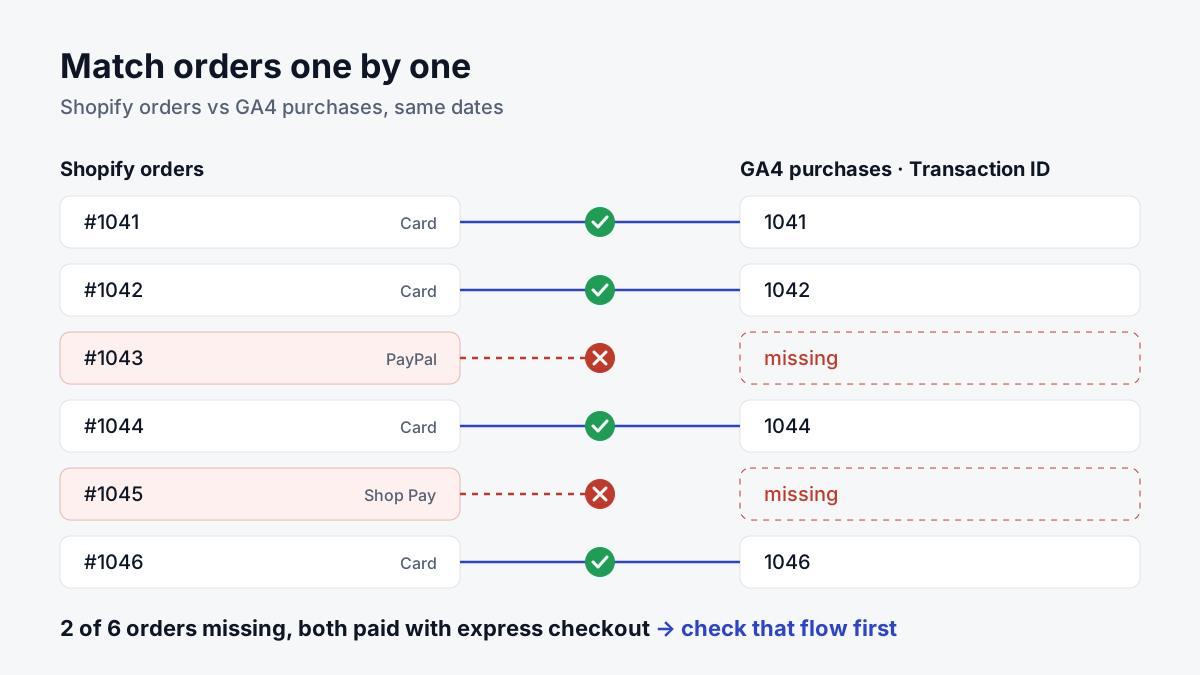
Comparing totals (Shopify says 312 orders, GA4 says 240) tells you there’s a problem, not where it is. Compare order by order instead.
- Pick a closed date range that ended at least two days ago. GA4 needs 24–48 hours to finish processing, and numbers can change during that time (Google: data freshness). Don’t judge from Realtime or DebugView. In our testing, a purchase that showed up in Realtime was still missing from the standard reports days later.
- Check that both tools use the same time zone. Compare GA4 (Admin → Property details) with Shopify (Settings → General). If they differ, late-evening orders land on different days.
- Export your Shopify orders for the range (Orders → Export). The export includes each order’s number and ID.
- List GA4 purchases by transaction ID. In GA4, open Explore → Free form. Add the dimension Transaction ID and the metric Ecommerce purchases, and set the same dates.
- Match the two lists. Check a few rows to see what your setup sends as the transaction ID: the order number or the long order ID. Then mark every Shopify order that has no GA4 row.
You now have a list of missing orders instead of a percentage.
One more quick check: compare views of your thank-you page with purchase events for the same days. In GA4, the thank-you page path usually contains thank-you. If the thank-you page shows up for most orders but purchases don’t, the page loaded and the purchase event itself failed. That’s the pattern merchants describe in the thread above.
What do the missing orders have in common?
Open a handful of the missing orders in Shopify. Look at the payment method, the device and the country.
| What you see | Most likely cause |
|---|---|
| A steady share is missing, across payment methods and devices | Ad blockers, privacy browsers, declined consent |
| Mostly orders from countries where you show a cookie banner | Declined consent, or a banner that doesn’t pass consent to the tags |
| Mostly orders paid with Shop Pay, PayPal, Apple Pay or Google Pay | The express checkout flow broke the tag |
| Nearly all missing since a specific date | The tag stopped running: a theme change, an app change, or the thank-you page upgrade |
| Nearly all missing from the start | The purchase event was never set up correctly |
| Phone orders, draft orders you marked as paid, POS sales | These never pass through the online checkout |
Orders arrive in GA4, but with source (not set) |
Not missing: the purchase wasn’t tied to the visit (see the end of this guide) |
Ad blockers and privacy browsers
GA4’s standard tags run in the visitor’s browser. When an ad blocker or a privacy-focused browser stops the GA4 script or its request, the purchase never reaches GA4. In our testing, that held no matter how GA4 was installed in the browser.
You can’t fix this inside the browser, but you can measure it. Ad blocker use varies a lot by audience: a store selling to developers or gamers loses far more than one selling to a general audience. The order-level comparison gives you your own number. Treat any industry-wide percentage as a guess.
Declined consent
If you show a cookie banner (required in the EEA and UK), what GA4 receives from a visitor who declines depends on your consent mode (Google: consent mode):
- Basic consent mode: Google tags don’t load until the visitor accepts. A visitor who declines sends nothing, so the purchase is simply absent.
- Advanced consent mode: tags load right away. For visitors who decline, they send cookieless pings that Google uses to model conversions, once your traffic passes a minimum threshold.
Modeled data is an estimate, not individual orders. In our tests, purchases from visitors who declined never showed up in Realtime or DebugView, and every page view arrived as if from a new visitor. Don’t expect these orders in your transaction ID list.
Shopify adds its own layer. In regions that require consent, Shopify’s pixels, including app pixels, only run once the visitor has given the permissions the pixel needs. By default that’s both analytics and marketing (Shopify: pixels).
How to check your setup:
- Open Settings → Customer privacy → Cookie banner and note which regions get the banner. Shopify’s own banner governs Shopify’s cookies and pixels (Shopify: privacy settings).
- If you use a consent app instead, make sure it’s connected to Shopify’s Customer Privacy API and set to the same regions. Shopify warns that mismatched regions can let data be processed before consent.
- If visitors who accepted are missing too, the consent update may reach your tags too late: the tag fires before the banner reports the choice. A merchant describes exactly this. Test it: accept on a fresh visit, place a test order, and check that the purchase arrives.
Express checkout: Shop Pay, PayPal, Apple Pay, Google Pay
Express buttons on the product page let customers skip the cart and go straight to checkout (Shopify: accelerated checkouts). Paying usually means a pop-up or a redirect to the payment provider, then a return to your store.
Each hand-off can break browser tracking. Code that expects the visitor to pass through the cart never runs. A customer closes the window right after paying. Or the purchase arrives without what GA4 needs to link it to the visit. In our weeks of testing, express buttons and some payment gateways broke purchase tracking on some browsers and operating systems, while the regular checkout worked. Merchants report the same with PayPal Express and Shop Pay. The opposite also happens: returning from a payment redirect can fire the purchase twice. That’s a duplicate problem, which we cover separately.
How to check: count your missing orders per payment method and compare with that method’s share of all orders. Then place a test order with each express button, on more than one browser and phone, and check whether the purchase arrives.
The tag stopped running
If purchases dropped to almost zero on a specific date, look for what changed that day.
- Thank-you page upgrade. Since August 28, 2025, the Additional scripts box in Shopify’s checkout settings is view-only. Non-Plus stores had until August 26, 2026 to upgrade their Thank you and Order status pages (Shopify: checkout upgrade). A purchase tag that lived in Additional scripts doesn’t run on the new pages. Tracking now belongs in pixels, under Settings → Customer events. To check your status, open Settings → Checkout: an upgrade notice means you’re still on the old pages.
- Reinstalled or reconnected apps. After reinstalling the Google & YouTube app, one merchant lost purchase events while every other event kept arriving. Check Settings → Customer events: the app’s pixel should be connected, and the app should point at the right GA4 property.
- Theme or app changes. A theme update can drop code pasted into
theme.liquid. Installing or removing an app can add a second tag or remove the only one. - Two setups at once. Running the Google & YouTube app alongside your own Google Tag Manager or gtag code can create duplicates, or setups that interfere with each other. Pick one source for each event.
The purchase event was never set up correctly
If GA4 has almost no purchases from day one, check the basics:
- Password protection is off. GA4 can’t track events while the online store is in private mode (Shopify: set up GA4).
- The GA4 property connected in the Google & YouTube app is the one you’re looking at.
- A test order (use a 100% discount code) produces a
purchaseevent in DebugView.
Check the parameters, not just the event. GA4’s purchase event needs four parameters (Google: purchase event):
transaction_id: identifies the order. It’s what your order-level comparison matches on, and it helps GA4 drop duplicates.valueandcurrency: the order’s revenue. Google notes thatcurrencyis required whenevervalueis set, or revenue isn’t computed accurately.items: the products. Each item needs anitem_idor anitem_name.
If the purchase arrives but one of these is missing or wrong, the order is counted with no revenue, wrong revenue, or no products. That shows up as revenue that doesn’t match Shopify, which is a separate problem from missing orders.
The Google & YouTube app is the official, free starting point. In our testing, though, it didn’t deliver every ecommerce event to GA4. If the order-level comparison still shows gaps that ad blockers and consent can’t explain, its browser-side tracking is the likely limit.
Orders that never pass through the online checkout
GA4’s purchase tracking sees the online store checkout. Some orders never go through it:
- Phone orders you enter as draft orders and mark as paid yourself. A merchant who takes most orders by phone found none of them tracked.
- Point-of-sale sales.
- Third-party checkout apps. If your store replaces Shopify’s checkout with another provider’s, Shopify’s checkout events may not fire reliably. Check with that provider how purchases reach GA4.
Filter these out of your Shopify list before comparing. Otherwise you’ll chase a gap that isn’t a tracking problem.
When purchases arrive but aren’t tied to the visit
Sometimes the purchase is in GA4 but its source shows as (not set). The order isn’t missing, but GA4 can’t credit the campaign that brought the customer. In our testing, this happened even with consent given:
- Purchases arrived without being linked to the visitor’s session.
- When a visitor allowed analytics but declined marketing, Shopify’s checkout pixel had no access to the visitor’s cookies, and checkout steps arrived without a session.
Revenue and attribution gaps are a topic of their own, and we’ll cover them in a separate guide.
Making it reliable
Some of the gap is fixable in the browser: remove duplicate tags, move old scripts to pixels, check that consent reaches your tags, and test express checkout on real devices. Ad blockers, declined consent and fragile hand-offs during checkout are limits of browser-side tracking that no tag setting removes. Some apps close that gap by sending each completed order to GA4 independently of the visitor’s browser. Whichever route you take, re-run the order-level comparison afterwards. It’s the only way to know the gap actually closed.
How we made this guide: written by the Metricby team, which tested these scenarios over several weeks on a Shopify development store, across checkout types, consent choices and browsers.